
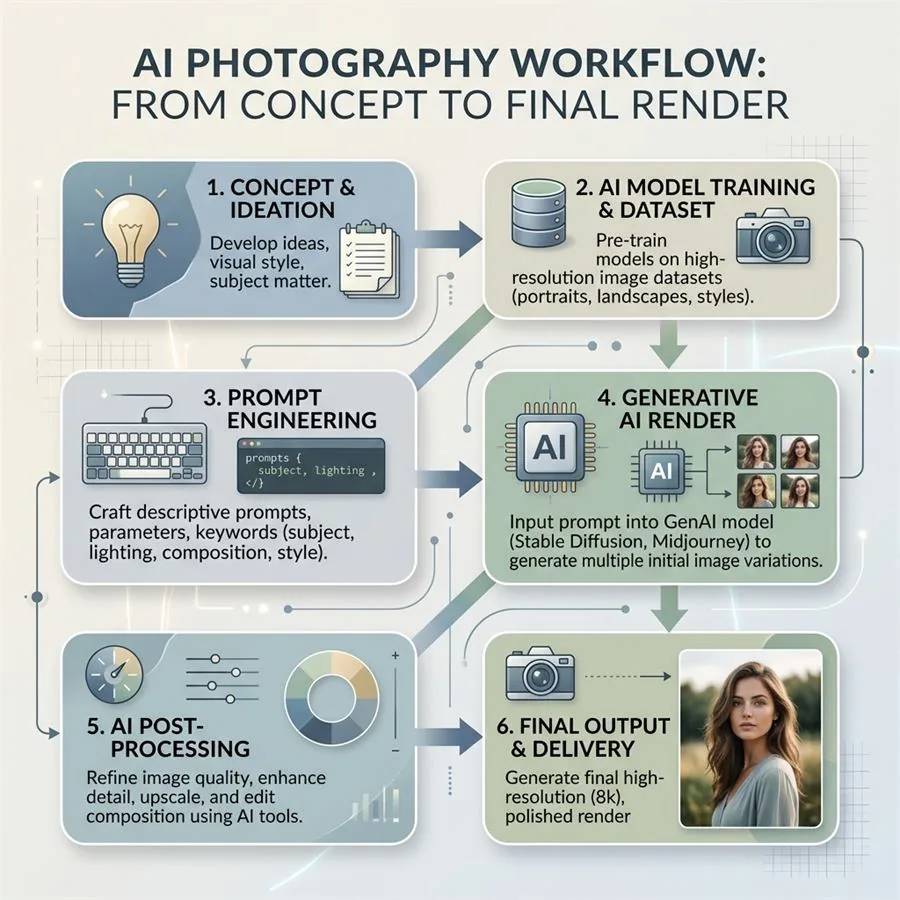
Efficiency separates successful AI photography practitioners from those overwhelmed by complexity. The right workflow transforms AI image generation from a chaotic, time-consuming process into a streamlined system that produces consistent, professional results at scale. This guide reveals the organizational and procedural systems used by leading practitioners.
AI Visual Creator Playbook
Want a repeatable workflow for your own images?
Use the Pixelense playbook to plan, direct, review, and refine AI-assisted visual work in-house.
Understanding the AI Photography Workflow
A comprehensive AI photography workflow encompasses seven key stages:
- Planning & Conceptualization: Define project goals and requirements
- Prompt Engineering: Develop detailed, effective image descriptions
- Generation & Batch Processing: Create variations at scale
- Selection & Curation: Identify best outputs from many options
- Enhancement & Post-Processing: Refine and finalize images
- Quality Control & Verification: Ensure consistency and quality
- Organization & Delivery: File management and client handoff
Stage 1: Planning & Conceptualization
Project Brief Development
Start with a comprehensive project brief:
- Objectives: What specific images are needed?
- Audience: Who will see these images?
- Brand/Style Guide: Visual aesthetic requirements
- Quantity: How many final images needed?
- Use Cases: Web, print, social, etc.
- Timeline: Delivery dates and milestones
- Budget/Resources: Available AI credits or tools
Mood Board & Reference Creation
Gather visual references that inform generation:
- Pinterest boards of similar content
- Color palettes and aesthetic direction
- Photography style references
- Existing brand assets for consistency
- Competitor or aspirational brand content
Stage 2: Prompt Engineering
Master Prompt Structure
Prompt Template Library
Build reusable templates for common scenarios:
Prompt Documentation System
Track every prompt for consistency and reference:
- Store prompts in organized cloud folder (Google Drive, Notion)
- Tag prompts by category, success rate, and project
- Document successful variations and results
- Rate prompts for reusability (1-5 stars)
- Include before/after enhancements for learning
Stage 3: Generation & Batch Processing
Batch Processing Strategy
Generate multiple variations efficiently:
Resource Optimization
- Budget Planning: Track credit usage per project
- Parallel Generation: Use multiple AI services simultaneously
- Priority Queue: High-value images generated first
- Testing Batches: Generate test sets with different settings
- Archive Strategy: Keep raw outputs for future reference
Stage 4: Selection & Curation
Selection Criteria Development
Establish consistent selection standards:
- Technical Quality: Sharp, artifact-free, high resolution
- Brand Alignment: Matches aesthetic and style guide
- Prompt Adherence: Follows specifications accurately
- Emotional Impact: Evokes intended feeling and response
- Uniqueness: Distinct from other selected images
- Usability: Cropping/composition works for end use
Curation Process
Curation Tools & Systems
- Google Photos/Flickr: Organize and star-rate images
- Adobe Bridge: Professional image management
- Figma Collections: Visual board for comparison
- Spreadsheet Rating: Track ratings with metadata
Stage 5: Enhancement & Post-Processing
Enhancement Workflow
Apply consistent refinements to selected images:
Batch Enhancement Process
Apply consistent edits efficiently:
- Create enhancement presets matching brand guidelines
- Apply base preset to all images in batch
- Make 10-20% individual adjustments as needed
- Export with consistent naming convention
- Create backup before exporting final files
Stage 6: Quality Control & Verification
QC Checklist
Verify each image meets standards:
- ? Image resolution matches specification
- ? Color profile correct (sRGB for web, AdobeRGB for print)
- ? No visible artifacts or anomalies
- ? Metadata properly embedded (copyright, keywords)
- ? Output format matches requirement
- ? File size within acceptable range
- ? Naming convention followed consistently
- ? Brand aesthetic consistent with guidelines
- ? Legal/ethical standards met
- ? Performance optimized (web images)
Consistency Verification
Ensure visual cohesion across image set:
- View images together at thumbnail size
- Check color grading consistency
- Verify tone and mood alignment
- Assess variety while maintaining cohesion
- Compare lighting consistency
Stage 7: Organization & Delivery
File Organization System
Naming Convention
Establish consistent, searchable naming:
Delivery Package Contents
- ? Final optimized images (multiple formats/sizes)
- ? High-resolution archives (backup copies)
- ? Enhancement presets used
- ? Metadata specifications (alt text, keywords)
- ? Usage rights documentation
- ? Project summary & specifications
- ? Delivery manifest with file checklist
- ? Technical specifications & compatibility notes
Workflow Optimization Tips
Time-Saving Strategies
- Template Everything: Reuse prompts, presets, and spreadsheets
- Batch Similar Work: Group similar projects together
- Keyboard Shortcuts: Master software hotkeys for speed
- Automation: Use batch processing tools (Lightroom Batch, Adobe Scripts)
- Delegation: Outsource curation/QC if scaling
- Review Frequency: Don't revisit images unnecessarily
Quality Consistency Strategies
- Documented Standards: Written brand guidelines for all team members
- Review Checkpoints: QC at multiple stages, not just end
- Version Control: Track changes and maintain audit trail
- Reference Library: Showcase of approved images for comparison
- Team Training: Ensure consistency across multiple users
Scaling Your Workflow
From Solo to Team
As you scale, formalize these processes:
- Document all procedures in written guides
- Create training materials for new team members
- Establish role clarity (generator, curator, processor, QC)
- Implement project management tools (Asana, Monday.com)
- Set up shared resource libraries (prompts, presets, standards)
- Establish review and approval gates
Future-Proofing Your Workflow
- Technology Flexibility: Design workflow to work with multiple AI tools
- Tool Independence: Not locked into single software
- Documentation: Detailed enough for knowledge transfer
- Continuous Improvement: Regular process review and optimization
- Adaptability: Able to quickly adjust for client changes
Conclusion
A well-designed workflow transforms AI photography from chaotic experimentation into professional production. The difference between successful practitioners and those struggling isn't artistic ability—it's systematic thinking and documented processes.
By implementing these workflow stages, you'll dramatically improve your output quality, reduce time spent on repetitive tasks, and scale your AI photography business sustainably.
Start with the stages most relevant to your current situation, gradually building a comprehensive system tailored to your specific needs and client requirements.
Related Decision Paths for AI Product Photography Workflows
The workflow changes depending on whether the goal is a listing image, a campaign scene, a catalog refresh, or a marketplace feed. Use these paths to choose the right branch before production starts:
- Reference intake: Start with phone product photography for AI if your source images are weak.
- Visual consistency: Use consistent product photos without a photographer when the catalog grid is the main problem.
- Channel workflows: Compare Shopify, Amazon, Etsy, and Google Shopping requirements before export.
- Proof and pricing: Review the Pixelense portfolio, service packages, and AI vs. traditional studio comparison.