
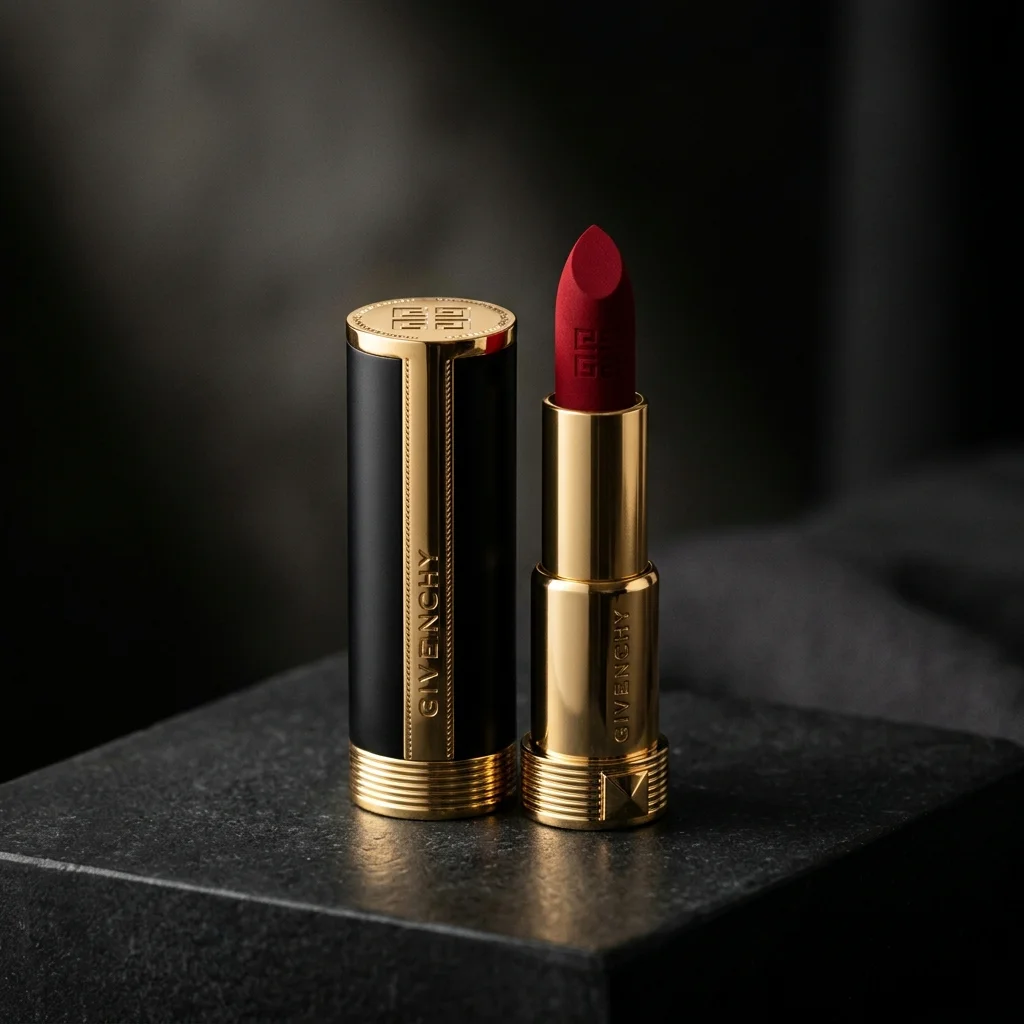
Prompting is more than describing a scene. For brands, it's about translating brand guidelines — tonality, colour palettes, lighting styles, and emotional register — into a language the AI understands. The difference between a generic AI image and a brand-ready asset lies entirely in the precision and structure of the prompt. This is what we call Strategic Prompting.
This guide shares the Pixelense prompt framework — the exact methodology our creative team uses to produce commercial-grade product imagery for Shopify stores, Amazon sellers, luxury brands, and fashion labels. Whether you're writing your own prompts or briefing an AI photography service, understanding these principles will dramatically improve your results.
AI Visual Creator Playbook
Want a repeatable workflow for your own images?
Use the Pixelense playbook to plan, direct, review, and refine AI-assisted visual work in-house.
The Anatomy of a Brand Prompt
A high-performing brand prompt follows a specific hierarchy. Each element adds a layer of control over the final output:
- [Subject] — The product itself, described precisely: "a matte black ceramic coffee mug with a thin gold rim"
- [Materiality] — Surface and texture specifications: "brushed aluminium body with a soft-touch silicone grip"
- [Environment] — Where the product exists: "on a warm oak kitchen counter beside a French press"
- [Lighting Mood] — The emotional quality of light: "soft morning window light from the left, warm colour temperature, gentle shadows"
- [Camera Specs] — Technical photography parameters: "shot on 85mm f/1.8, shallow depth of field, eye-level angle"
- [Style Reference] — Aesthetic direction: "clean editorial style, minimal composition, Kinfolk magazine aesthetic"
By defining the "f-stop," the "film grain," and the "lens focal length," you move from a generic AI image to a bespoke brand asset that could sit alongside professionally shot imagery without looking out of place.
The Layered Prompting Technique
The most effective product photography prompts follow a layered structure — starting with the most important elements and adding refinement:
Layer 1 — Core subject: "A luxury leather handbag in cognac brown"
Layer 2 — Add environment: "...resting on a dark marble surface in a high-end boutique setting"
Layer 3 — Add lighting: "...illuminated by soft directional spotlight from upper right, deep shadows, moody atmosphere"
Layer 4 — Add camera: "...photographed with a 50mm lens at f/2.8, slight overhead angle, shallow depth of field"
Layer 5 — Add style: "...clean commercial photography, minimal styling, luxury brand catalogue aesthetic, no text"
Each layer adds precision without overloading the prompt. This technique prevents the common problem of "prompt soup" — where too many competing directives cause the AI to produce confused, incoherent imagery.
Avoiding the "AI Look"
The most common mistake in AI product photography is over-description. Beginners tend to add every modifier they can think of: "hyperrealistic, 8K, trending, professional, ultra-detailed, award-winning." Ironically, these generic quality boosters often produce the oversaturated, plasticky aesthetic that immediately identifies an image as AI-generated.
To achieve a high-end, realistic look, follow these principles:
- Use specific photography terms instead of generic quality modifiers. "Shot on Hasselblad medium format" is infinitely more effective than "hyperrealistic 8K."
- Reference real photography styles. "Editorial product photography in the style of a Monocle magazine feature" gives the AI a specific visual target.
- Include negative prompts to strip away unwanted AI artefacts: exclude "oversaturated, plastic-looking, cartoon, illustration, watermark, text overlay."
- Allow breathing room. Don't describe every pixel. Let the AI interpret the lighting naturally within the constraints you've set. Over-specified prompts produce stiff, unnatural results.
- Specify imperfections. Real photography has subtle imperfections — slight vignetting, natural colour variation, imperceptible grain. Including these signals produces more photorealistic results.
Prompts for Different Product Categories
Fashion and Apparel
Fashion products demand attention to fabric texture, drape, and how light interacts with different materials. Key prompt elements: specify the fabric type ("brushed cotton," "silk charmeuse"), the garment's form ("laid flat," "on invisible mannequin"), and the styling context ("minimal white studio," "fashion editorial with natural daylight").
Jewellery and Accessories
Reflective and transparent materials are the most challenging for AI. Key prompt elements: specify the metal finish ("polished rose gold," "brushed sterling silver"), the stone treatment ("faceted emerald with internal inclusions"), and the lighting setup ("focused spotlight with black negative fill for dramatic contrast").
Food and Beverage
Food photography prompts need to emphasise freshness, texture, and appetite appeal. Key prompt elements: specify the food's state ("steam rising," "condensation on glass"), the surface ("rustic wooden cutting board," "white marble with herbs"), and the lighting ("bright overhead with side fill, natural daylight feel").
Electronics and Tech
Tech products require precision and clean aesthetics. Key prompt elements: specify the finish ("anodised space grey aluminium"), the screen state ("display showing gradient wallpaper"), and the composition ("45-degree angle on reflective black surface, minimal gradient background").
Building a Brand Prompt Library
The most efficient approach to AI product photography is building a prompt library — a collection of tested, refined prompts organised by product category, scene type, and brand mood. Each prompt in the library has been through multiple iterations and produces reliably consistent results.
At Pixelense, we maintain prompt libraries for every client, structured as base prompts with modular components that can be swapped:
- Base prompt: Core brand aesthetic, camera setup, and quality parameters (stays constant)
- Scene module: Environment and surface description (swapped per shoot concept)
- Product module: Specific product description (swapped per SKU)
- Seasonal module: Seasonal styling elements (swapped per campaign)
This modular approach ensures brand consistency while allowing creative variation — the photographic equivalent of a brand style guide applied to every image automatically.
Product prompts and character prompts solve different consistency problems. Product prompts stabilize materials, packaging, camera, and scene. Character prompts stabilize facial identity while expression, gaze, and posture change. Use our same-character AI image guide for the identity workflow, then review the Consistent Character Emotions Prompt Pack when you want the complete reusable system.
AI Visual Creator Playbook
Build your next image set with a clearer process.
Use the Pixelense playbook to plan, direct, review, and refine AI-assisted visual work in-house.