
Consistent AI character guide
How to keep the same character in AI images.
The short answer: lock a precise identity anchor, separate it from everything allowed to change, reuse references when available, and adjust only one variable group at a time.
By Zubair Zafar · Published July 11, 2026 · Practical workflow
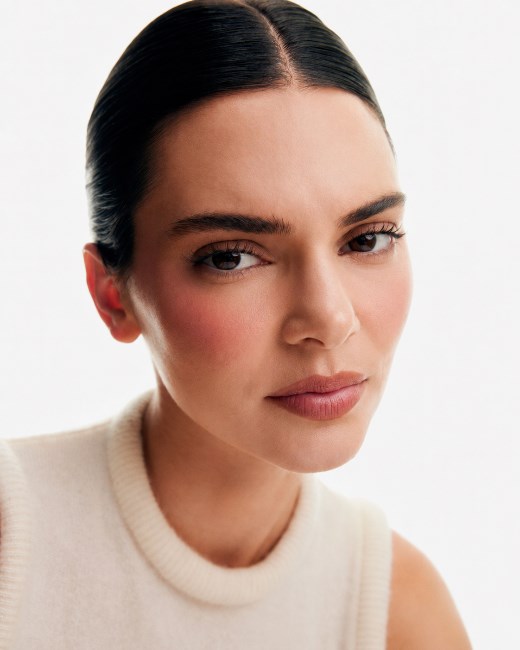
Why faces drift
Most prompts mix identity and direction into one unstable paragraph.
Character consistency fails when permanent traits and temporary instructions compete. A prompt might change hairstyle, age language, camera distance, wardrobe, lighting, expression, and pose at the same time. The model then has too many valid ways to reinterpret the person.
Consistency improves when you treat the character like a small design system: one stable identity definition, one controlled reference, and modular instructions for emotion, composition, and scene.
Step 1
Write a reusable identity anchor.
The identity anchor should contain only details that must survive every generation. Keep it specific enough to be recognizable but short enough to repeat without contradictions.
- Approximate age range and face shape
- Skin tone and visible texture
- Eye shape, eye color, brows, nose, and lips
- Hair color, texture, length, and parting
- One or two distinctive but natural features
- Default camera distance and portrait treatment
Avoid subjective filler such as “perfect,” “stunning,” or “the most beautiful.” Those words add style pressure without preserving identity.
Step 2
Separate stable details from variables.
Keep stable: facial structure, hair, age range, skin tone, distinctive features, and the core portrait treatment.
Change deliberately: emotion, gaze, posture, wardrobe, background, crop, lighting mood, and channel format.
When an output drifts, return the variable groups to their last known-good state. Change only the expression first; then pose; then scene. This makes the source of the drift visible.
Step 3
Use a modular consistent-character prompt formula.
[stable identity anchor] + [emotion verb] + [micro-expression cues] + [pose and gaze] + [camera and lighting] + [scene or channel]
Example: Same base woman with an oval face, warm medium skin, almond brown eyes, softly arched brows, shoulder-length dark wavy hair with a center part; expressing calm reassurance; softened eyelids, relaxed forehead, subtle closed-mouth smile, steady eye contact; editorial beauty close-up, soft window light, clean warm background, space for carousel copy.
The phrase “same base woman” is not enough by itself. The identity anchor that follows it gives the model something concrete to preserve.
Step 4
AI Visual Creator Playbook
Want a repeatable workflow for your own images?
Use the Pixelense playbook to plan, direct, review, and refine AI-assisted visual work in-house.
Direct emotion through visible facial behavior.
Broad labels such as “happy,” “sad,” or “confident” can produce exaggerated or generic expressions. Translate the emotion into visible cues:
- Calm confidence: relaxed jaw, steady gaze, level brows, slight mouth-corner lift
- Concern: inner brows raised, lips gently pressed, focused eyes, slight forward posture
- Delighted surprise: widened eyes, lifted cheeks, raised brows, smile beginning rather than fully open
- Soft reassurance: softened eyelids, small natural smile, relaxed forehead, balanced posture
Step 5
Use references and seeds as support, not substitutes.
If your image tool accepts a reference image, reuse the clearest front-facing result with neutral lighting and minimal occlusion. Keep reference strength and aspect ratio stable while testing expressions.
Seeds can help some tools repeat composition or style, but they do not replace a consistent identity description. Model updates, different settings, and prompt changes can still shift the face.
Common mistakes
What breaks character consistency fastest.
- Changing five variables in one generation
- Using conflicting age, hair, or face-shape language
- Switching between extreme close-ups and full-body scenes too early
- Letting wardrobe or lighting hide identity-defining features
- Adding long lists of generic quality words
- Judging one lucky output instead of testing a repeatable sequence
Want the reusable system?
Turn this workflow into repeatable emotion prompts.
The 12-page Pixelense pack expands the identity anchor, emotion direction, micro-expression, and visual modifier method with adaptable formulas and six public result previews.
Frequently asked questions
Consistent AI character questions.
Can a prompt guarantee the exact same face?
No. A strong prompt, reference image, and controlled workflow can reduce drift, but model behavior varies and no natural-language prompt guarantees pixel-identical identity.
Should I keep the same seed?
Use the same seed when your tool supports it, but treat it as one control among several. Keep the identity anchor, reference, model, aspect ratio, and major settings stable too.
How do I change emotion without changing identity?
Reuse the complete identity anchor and change only the emotion verb plus visible micro-expression cues. Test expression before changing wardrobe, pose, background, or camera distance.
Does this workflow work with every AI image tool?
The principles are model-agnostic, but syntax, reference controls, seeds, and adherence vary. Adapt the wording to your tool and keep a record of the settings that produced the strongest identity.
AI Visual Creator Playbook
Build your next image set with a clearer process.
Use the Pixelense playbook to plan, direct, review, and refine AI-assisted visual work in-house.