
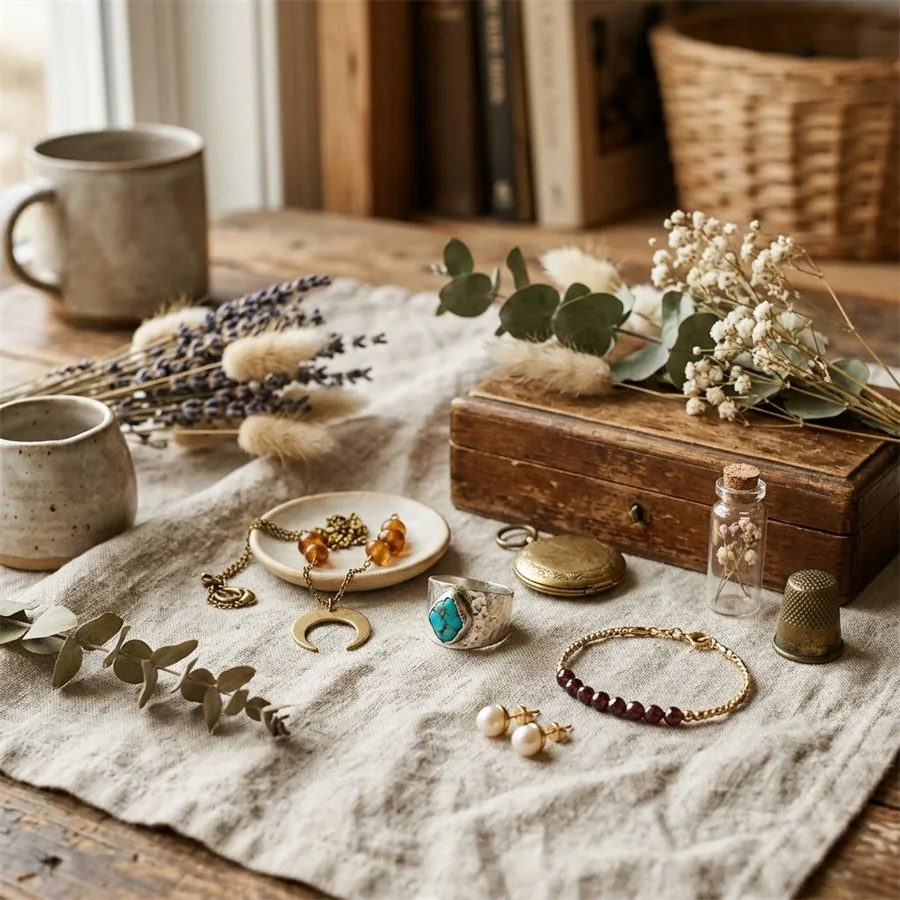
If you sell on Etsy, you already know what the platform actually rewards: imagery that looks handmade, considered, and a little bit personal. The shops that quietly do well aren't the ones with the slickest white-background catalogue shots — they're the ones whose listing photos look like the product was just placed on someone's kitchen table on a Sunday afternoon, with good light and a careful eye for what's in frame.
That visual language is harder to produce than it looks. A genuinely well-styled lifestyle shot involves a surface, a few props, the right time of day, and a photographer who knows what they're doing. For a maker selling handmade jewellery at thirty-five dollars a piece, the math has never worked out. You'd need to sell a lot of necklaces to justify a styled shoot. So most sellers either improvise with their phone, which limits how the shop reads, or use the seller-submitted manufacturer photos for resold inventory, which looks like everyone else's listings.
Etsy product photography
Want a practical recommendation for your product?
Share the product, sales channel, deliverables, and timing. Pixelense will recommend the clearest scope without changing the published starting rates.
This is the gap that AI photography has quietly closed for Etsy sellers in the last year or so. You can now get the styled, well-lit, contextual imagery that ranks well and converts on Etsy without the studio bill.
What Etsy's algorithm actually cares about (image edition)
Etsy's search isn't quite a black box. It's been clear for some time that listing quality — how often people click on your listing from a search result, and how often they buy once they click — is one of the strongest signals in the ranking. Both of those metrics are downstream of your images. Your thumbnail decides whether someone clicks; your secondary images decide whether they convert.
Some practical Etsy specifics worth knowing:
- Etsy recommends listing photos at 2000 pixels on the long edge or larger. The platform's zoom function only works well above that threshold; smaller images noticeably degrade.
- Etsy displays photos in a 4:3 landscape ratio by default in the listing card, but the standalone listing page shows them at their native aspect. Square (1:1) is the safest choice across both.
- You get up to ten image slots per listing. The shops that fill all ten consistently outperform the shops that use three or four — not because more is automatically better, but because buyers who scroll through ten images are buyers who are seriously considering a purchase.
- One short video per listing. If you have the option, use it. Etsy weights listings with video noticeably more favourably.
Unlike Amazon, Etsy does not require white-background photography. The marketplace's whole identity is built around the opposite — buyers come to Etsy expecting to see products in context, with character, with a sense that someone made or curated the item. Lifestyle imagery wins here in a way it doesn't elsewhere.
How the workflow actually goes
There's no need to overcomplicate this. You photograph your product in decent daylight near a window — good clear phone shots, a few angles, a plain background. You send those references over with a short note about the mood you want (cosy, minimal, summery, festive — whatever fits the piece). A couple of days later you have a set of styled images you can drop straight into your listings.
The styling choices are where the work goes. For an Etsy listing, the question we'd ask is who the buyer is and what room they imagine the product living in. A ceramic candleholder for a thirty-five-year-old in Brooklyn lives in a different scene from the same candleholder for a sixty-year-old in the Cotswolds. The product is the same; the lifestyle context is different. Getting that judgement right is the part of the brief worth spending time on.
How to use your ten image slots
There's no single right order for these, but a stack that consistently performs on Etsy looks something like this:
- Thumbnail. A lifestyle shot of the product in its most appealing context. This is the image doing nearly all the work in search results. Spend the most time on this one.
- Clean product shot. A clear, well-lit photograph of just the item, showing the whole thing. This is what a buyer looks at when they want to confirm they understand what they're getting.
- Scale reference. The product being held, worn, or placed next to something everyday — a coffee cup, a hand, a doorway. Etsy buyers consistently mis-judge size without this.
- Detail close-up. The stitch, the glaze, the engraving, the texture. This is where craftsmanship signals come through. For handmade pieces, this image often closes the sale.
- Alternative context. A second lifestyle shot in a different setting or season. Tells the buyer the piece is versatile.
- Alternative angle. Back, side, top — whichever shows something the front view doesn't.
- Variants. If your listing offers colour, size, or personalisation options, show them together in one image. Cuts a question your buyers would otherwise ask.
- Packaging or gift presentation. Etsy is the world's gift-shopping engine. If your packaging looks considered, show it. If it doesn't, this is worth fixing before you photograph anything.
- An information graphic. Dimensions, care instructions, materials, what's included. Simple text-on-image. Reduces returns and customer-service messages.
- Brand or maker context. A photograph of you working on the piece, your studio, a hand-written card you include — anything that signals there's a real person behind the listing. For premium-priced handmade work, this image disproportionately drives conversion.
Of those ten, AI photography is well-suited to handle the first eight. The last two are best produced from your own life — and shouldn't be expensive.
For digital and print-on-demand sellers
A growing share of Etsy shops sell digital downloads — printable wall art, planner templates, social-media graphics — or print-on-demand items like mugs and apparel where there's no physical inventory. For these sellers, lifestyle mockups aren't a nice-to-have. They are most of the listing.
A flat preview of a digital print sells nothing. The same print shown framed on a sun-lit wall above a console table, with a vase and a stack of books beside it, sells. AI photography is particularly strong on this — you provide the digital artwork, describe the room and the styling, and you get back a credible scene with your artwork in the frame. For a digital seller with twenty designs, the difference between a credible mockup library and stock-template mockups is the difference between converting and not.
The small SEO details that compound
Most Etsy SEO writing focuses on titles and tags, which is reasonable because they have the biggest direct impact. But there are some image-level habits worth building that compound across your catalogue over time:
- Name your image files descriptively before uploading. "Hand-thrown-ceramic-mug-cobalt-glaze.jpg" rather than "IMG_4821.jpg." Etsy doesn't index this directly, but Google does when your listing appears in image search.
- Use Etsy's alt-text field on every image. It's a small box, but it's one of the few accessibility and SEO levers you have on the platform.
- Keep your file sizes sensible. Under a megabyte per image is a reasonable target. Listings that load fast on mobile retain more buyers, particularly on the Etsy app, where most browsing now happens.
Where this fits in
If you've been selling on Etsy for a while, you probably already have a mental list of which of your listings deserve better photography. The pieces that get clicks but not sales. The seasonal items where the original shots are dated. The new releases you haven't had time to photograph yet.
That's the natural place to start. Pick five or six of your highest-priority listings, brief them through, and judge the work against your existing photography. The first batch tells you whether the studio you're working with understands the Etsy aesthetic — which is less about polish and more about specificity. If the work feels generic, push back. If it feels right, scale.
When you're ready, use the Etsy listing photo size guide for 2026 for current dimensions, thumbnail crop guidance, and first-image search tips. Sellers expanding to other channels can compare the Shopify image workflow, Amazon listing stack, and TikTok Shop creative workflow. Then share your shop and product brief so Pixelense can recommend an appropriate first batch.
Etsy product photography
Request a project-fit review for your next image set.
Share the product, sales channel, deliverables, and timing. Pixelense will recommend the clearest scope without changing the published starting rates.