
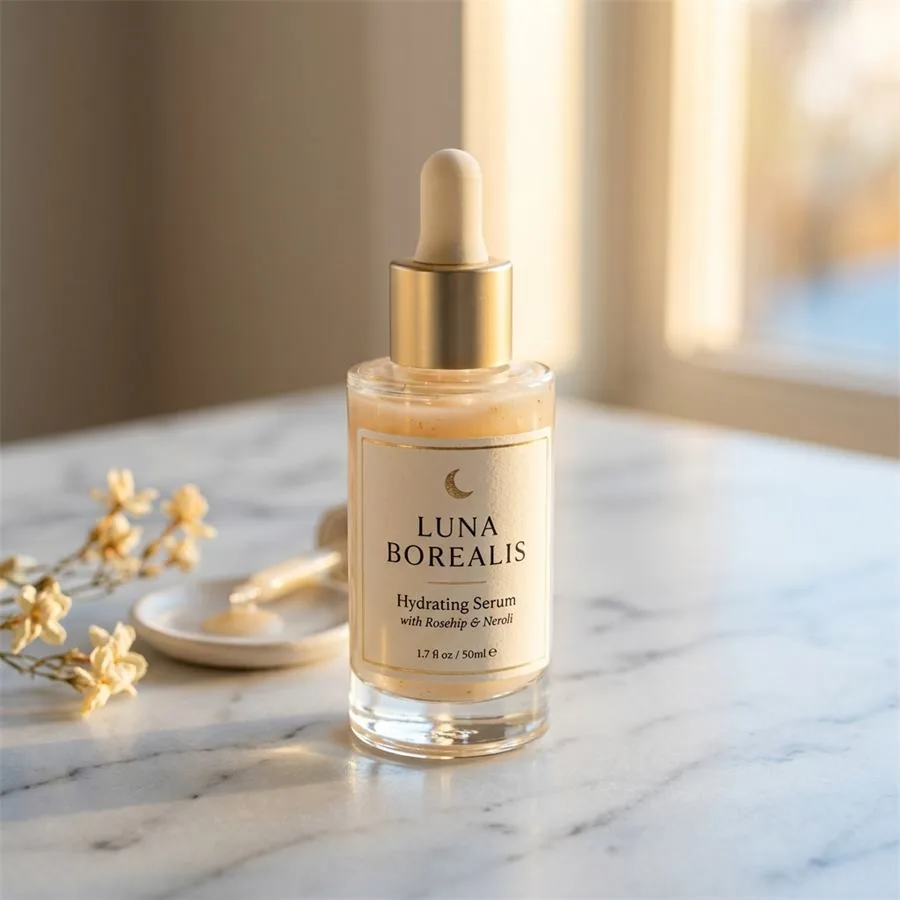
Your Shopify store's conversion rate lives and dies by its product images. According to Shopify's own research, stores that upgrade their product photography see an average 9–40% lift in conversion rate — yet the single biggest barrier most merchants cite is the cost and logistics of professional photography. AI product photography removes that barrier entirely.
Whether you're running a one-product dropshipping store or managing 500 SKUs across multiple collections, this guide explains exactly how to get studio-quality Shopify product photos without booking a studio, hiring a photographer, or shipping your inventory across the country.
Shopify product photography
Want a practical recommendation for your product?
Share the product, sales channel, deliverables, and timing. Pixelense will recommend the clearest scope without changing the published starting rates.
Why Product Images Are Shopify's Most Valuable Conversion Tool
Shoppers can't touch, smell, or try your product before buying. Every purchase decision is made entirely on trust — and your images are the primary trust signal. A blurry photo taken under a kitchen light tells customers one thing: this brand doesn't invest in quality. A clean, well-lit, professionally composed image communicates the opposite.
In Shopify's ecosystem, product images also impact your store's SEO. Google's image search drives a meaningful percentage of organic traffic to product pages, and correctly sized, alt-tagged images perform better than low-resolution uploads. Poor images also increase return rates: customers who receive a product that doesn't match its photo are significantly more likely to file a dispute.
The data is clear. Shopify merchants who invest in professional product imagery consistently outperform those who don't — on conversion rate, on return rate, and on average order value. The question is no longer whether to invest in great images, but how to do it efficiently.
Shopify Image Specifications: What You Actually Need
Before discussing AI photography, it's worth understanding exactly what Shopify requires — and recommends — for product images:
- Minimum resolution: 800 x 800 pixels. Shopify's zoom feature requires at least this size to function correctly.
- Recommended resolution: 2048 x 2048 pixels for the main product image. This provides crisp zoom quality on high-density screens.
- Aspect ratio: Square (1:1) is the Shopify default for consistent grid layouts. Landscape (4:3) works for some themes, but square is the safest choice.
- File format: JPEG for photographs (smaller file size, faster load), PNG for images requiring transparency.
- File size: Under 20MB per image. For performance, aim for under 500KB after compression.
- Background: Pure white (RGB 255, 255, 255) for main product images. Lifestyle or contextual backgrounds for secondary images.
All Pixelense deliverables are sized to 2048 x 2048 pixels by default and compressed for web performance without visible quality loss. Every file arrives Shopify-ready.
White Background vs. Lifestyle Shots: When to Use Each
Shopify product pages perform best when they combine two distinct image types: clean white-background shots for the main listing image, and lifestyle or contextual shots for the supporting gallery.
White background images are the workhorse of e-commerce. They let customers see the product clearly with no visual distractions, they display consistently across every device and theme colour, and they align with Google Shopping requirements. For apparel, this typically means ghost mannequin or flat-lay; for hard goods, it means a perfectly clean product-on-white studio look.
Lifestyle images do the emotional selling. They answer the customer's unconscious question: "Does this fit my life?" A candle photographed on a marble bathroom shelf sells a mood, not just wax. A gym bag photographed in a locker room context sells an identity. For Shopify, lifestyle images belong in positions 2–6 of your gallery, after the clean main shot.
AI photography handles both categories. Pixelense generates pure white-background cutout images and scene-placed lifestyle compositions from the same source reference photos you send us. You don't need two separate shoots.
How AI Photography Fits the Shopify Workflow
The traditional product photography workflow for a Shopify merchant looks like this: photograph or ship the product, wait for a booking slot, attend or coordinate the shoot, wait 7–14 days for editing, receive files, upload to Shopify, and optimise. Total time from idea to live listing: 3–6 weeks.
The AI photography workflow with Pixelense compresses that timeline dramatically:
- Day 1: You photograph your product with your phone — multiple angles, good natural light, plain background where possible — and submit via our project intake form.
- Day 2: Our team processes your reference images through our AI production pipeline, generating white-background shots, lifestyle scenes, and any close-up detail images you've requested.
- Day 2–3: You receive a delivery of web-optimised, Shopify-ready files — named, sized, and tagged — ready to upload directly to your product listings.
For merchants launching new collections or running seasonal campaigns, this speed difference is transformative. You can react to trends, test new product angles, and refresh your store's visual identity without the weeks-long lead time of traditional photography.
Cost Comparison: AI Photography vs. Hiring a Photographer
Let's look at the real numbers. For a small Shopify store with 20 products, each needing 5 images (1 white-background + 4 lifestyle), that's 100 images total.
- Traditional photographer (day rate): $500—$1,500 per day, plus editing fees of $10—$30 per image. For 100 images: $1,500—$4,500 minimum, and that assumes everything fits in one day.
- Freelance product photography studio: Typically $25—$75 per image for edited, delivered files. For 100 images: $2,500—$7,500.
- Pixelense AI photography: Starting from $5—$15 per image depending on package. For 100 images: significantly under $1,000.
Beyond the direct cost, consider the indirect costs of traditional photography: travel time, product shipping, re-shoots when images don't match your vision, and the cognitive overhead of coordinating a shoot. AI photography eliminates all of these.
For scaling Shopify brands that add new products regularly, the cumulative saving over 12 months can reach tens of thousands of dollars — money that can be reinvested into Shopify ads, influencer partnerships, or inventory expansion.
Getting the Most from AI Product Photography on Shopify
A few practical tips to ensure your AI-generated images perform as well as possible on your Shopify store:
- Send multiple angles: The more reference photos you provide, the more accurately AI can reconstruct your product. Front, back, side, top, and any key details.
- Specify your brand aesthetic: Tell us if you want a minimal Scandinavian feel, a bold streetwear energy, or a soft botanical mood. AI photography is art-directed, not random.
- Use descriptive file names: When uploading to Shopify, name files with your product and keyword (e.g.,
leather-crossbody-bag-tan-front.jpg), not generic strings likeIMG_4821.jpg. This helps with Google image indexing. - Write meaningful alt text: Shopify allows alt text on every image. Describe the product specifically — "tan leather crossbody bag with gold hardware on white background" — for both accessibility and SEO benefit.
- Compress before upload: Pixelense delivers web-optimised files, but if you're adding additional images, run them through a tool like Shopify's own image optimiser or TinyPNG before uploading.
To see examples of the quality Pixelense delivers, visit our portfolio page. For exact export dimensions, ratios, and file limits, use the Shopify product image size guide for 2026. For a full breakdown of what's included in each package, see our services page.
Which Shopify Merchants Benefit Most from AI Photography?
AI product photography is particularly valuable for:
- Shopify merchants launching new products frequently — AI removes the bottleneck of scheduling photoshoots for every new SKU.
- International sellers who need images optimised for multiple markets (different backgrounds, model ethnicities, seasonal contexts) without running multiple shoots.
- Dropshippers and print-on-demand sellers who want polished images without needing physical stock on hand.
- Small brands with tight margins who need professional-grade visuals without a professional-grade photography budget.
- Shopify Plus brands managing hundreds of SKUs who need to maintain visual consistency at scale.
The consistent theme is this: wherever photography has historically been a bottleneck or a budget concern, AI removes the constraint. For Shopify stores — where image quality is directly tied to revenue — that matters enormously.
Ready to see what your products look like with studio-quality AI photography? Start a project with Pixelense and receive your first images within 24 hours.
Related Decision Paths for Shopify Sellers
If you are planning a full Shopify image system, do not stop at one product-page hero shot. Use these supporting paths to decide what your image stack should include:
- Need exact dimensions? Use the Shopify product image size guide before export.
- Selling across marketplaces? Compare the Amazon image stack, Etsy listing workflow, TikTok Shop creative, and Google Shopping feed rules.
- Working from phone photos? Start with better product reference photos so the AI workflow has accurate shape, label, and material cues.
- Choosing a production model? Compare AI vs. traditional studio photography or review the Pixelense portfolio transformations.
Shopify product photography
Request a project-fit review for your next image set.
Share the product, sales channel, deliverables, and timing. Pixelense will recommend the clearest scope without changing the published starting rates.